reflo
A motion-capture pilates coach that lives in your browser. It watches your form through the camera you already own and corrects you out loud, mid-rep, in real time.
Best experienced on a mobile browser. Open in Safari or Chrome on your phone and allow camera access. The live workout screen has a skip button to jump to the last 15 seconds for demo purposes.
Built solo, shipped to the web, and now in the hands of the people it's for.
Reflo is a solo build: research, brand, interaction design, and engineering. I shipped it end to end, then put it in front of real users.
Reformer classes run $40 to $70. Beginners, the people who most need eyes on their form, are exactly the ones priced out.
Reformer pilates is one of the most effective ways to train, and one of the least accessible. The alternative to a studio is practicing alone off a video that can't see you, which is how bad habits and injuries start. The beginner is stuck in a loop: too new to self-correct, too priced-out to get corrected.
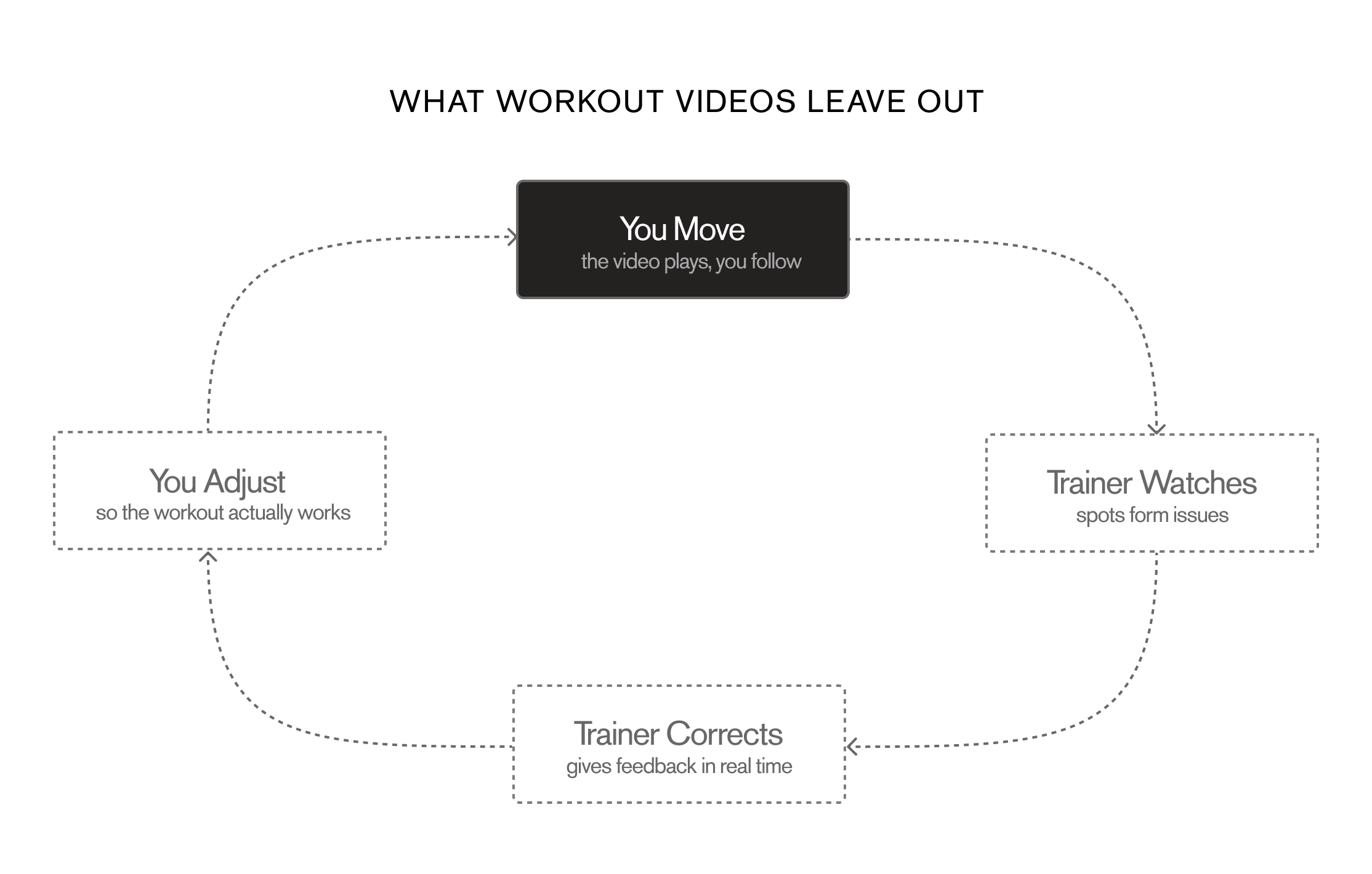
The video can't see you. Reflo can.
Reflo turns a propped-up phone into a form coach that watches you move and corrects you out loud, in real time. One camera, one angle, no depth sensor.
Underneath, it's a real-time spatial interaction: persistent body tracking, graphics registered to a live view, and audio feedback tied to movement, running on the camera everyone already owns.
Mid-plank, you can't touch a screen. The body is the input. The voice is the interface.
During a session the phone is propped six feet away, your hands are loaded, and your eyes are on the mat or the ceiling. Every convention of mobile design breaks. So Reflo has no taps mid-workout: the skeleton overlay communicates system state in a single glance, and all coaching travels through audio, timed to never collide with the instructor's voice.
- 01
The system sees you
The browser's getUserMedia API streams the camera feed. MoveNet SinglePose Lightning detects 17 body landmarks every frame and computes joint angles entirely on-device. No video ever leaves the phone.
- 02
State you can read in a glance
A canvas layer draws the skeleton over the live feed. Red means tracking is active. Teal means a correction landed or your form is clean. Grey means confidence dropped or you left the frame. Color is the entire status UI.
- 03
A voice that waits its turn
When a joint angle crosses a threshold, a correction queues and fires in the next silent gap in the audio track, never over the instructor. Positive feedback plays when form stays clean, because coaching isn't only criticism.
The rules the voice follows
Joint angles are computed every frame with dot-product math against known landmark positions. A 5-frame rolling average smooths jitter, so a wobble never triggers a false correction.
Long Stretch
Hip angle > 195° (pike)
Drop hips down, squeeze the glutes
Long Stretch
Hip angle < 160° (sag)
Squeeze glutes and lift hips back up
Long Stretch
Ear-shoulder angle < 25° (head drop)
Curl higher, chin away from chest
Certified instructors told me not to compete with the studio. So Reflo became homework.
Reflo has been developed in ongoing consultation with certified pilates instructors, and is now in live testing with 3 of them. They shaped the exercise library, validated that correction cues match how they actually teach, and pressure-tested the concept itself. Two findings shaped everything:
People go to studios for community and the felt, hands-on correction a camera can't replicate. Any product that pretends to replace touch will be rejected by the people who understand the practice best. So Reflo doesn't. It's positioned as homework between the classes you're already paying for, so you arrive with cleaner fundamentals and get more out of every session.
A single side-view camera is genuinely reliable for gross positional errors: piking, sagging, dropping. It cannot see rotation or depth, and faking confidence there would destroy trust. Detection is deliberately scoped to what the camera can honestly verify, and the per-rep timing that paces generated workouts is calibrated with instructors, because tempo, holds, and breath are the parts of pilates that generic rep-counting gets wrong.
3 instructors, bought in
Certified reformer instructors agreed the app was worth their time and are actively shaping its exercise library and cues. Winning over the people most protective of the practice was the validation that mattered most.
Testers who want to keep going
Early testers have said they would fold Reflo into their home routine and pay for more generated routines. It is a small group, but the intent to return and to pay is the signal I was testing for.
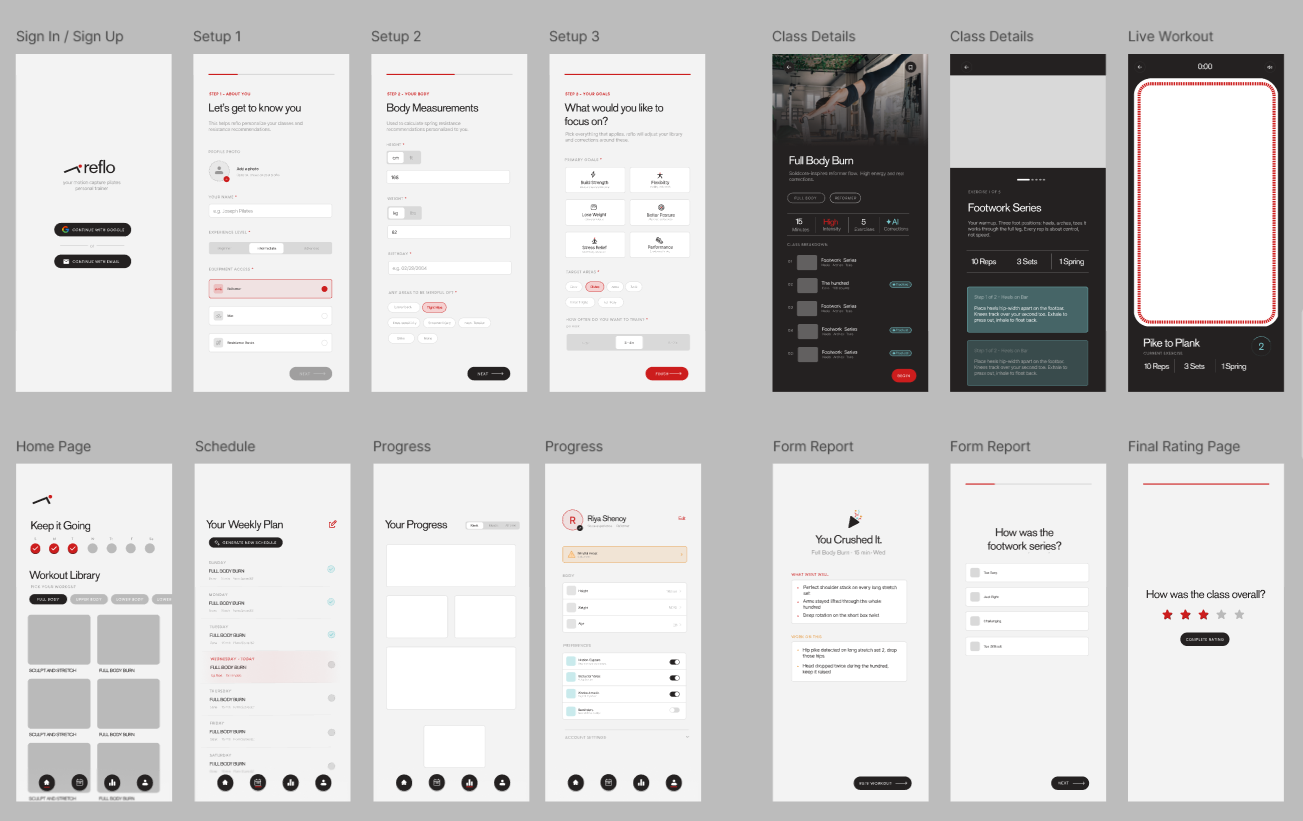
Every screen started on paper, and every color in the system has exactly one job.
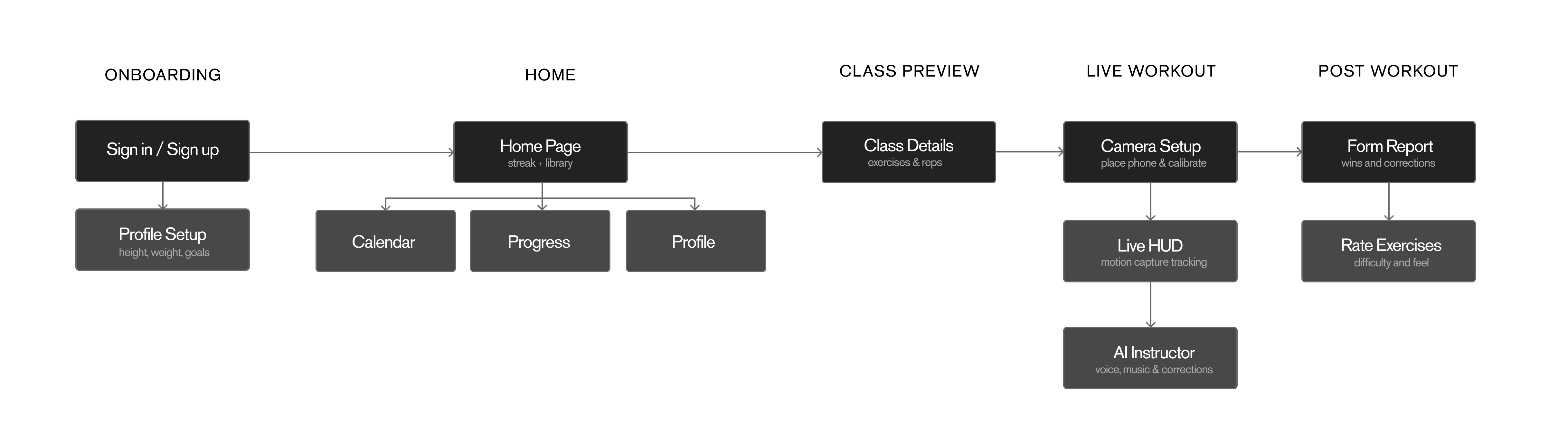
The flow was mapped and every screen wireframed before any code. The design system came before the branding pass, so color, type, and mark each carry a single defined role across the whole app.
Click a card
Signal Red
Active and action. CTAs, today's session, selected states, and anything that asks you to move. Used sparingly so red always means do something. It's also the dot in the logo, a tracked joint, echoed as a 4px square throughout the UI.
The same handful of coded components compose every screen, each cycling through its own states.
Under the hood: the systems that keep a live session honest.
A data model built for streaks, not just storage
Firebase Auth handles accounts; Firestore stores every completed session as structured data, not a flat log. Streak, calendar, and progress are all derived views over that one source of truth, so a finished workout updates all three at once and history stays consistent.
Inference runs on the device, not a server
MoveNet SinglePose Lightning runs entirely in the browser through TensorFlow.js. Its lower inference cost held a steadier frame rate on mid-range phones than BlazePose, and no frame ever leaves the device, which keeps latency low and the camera feed private by default.
The AI is validated, never trusted
Routine generation never writes model output straight to the screen. Every exercise reference is checked against the real library, rep and set counts are bounds-checked, and any failure falls back to a deterministic local plan. A bad generation degrades into a working workout, never a broken screen.
Two voice engines behind one pipeline
The flagship class is a hand-produced ElevenLabs track; generated routines use OpenAI TTS on a weekly quota, since live synthesis is the only real per-use cost. One voiceMode branch routes both through the same tracking and HUD, so the experience stays identical while cost stays controlled.
Built to survive a dropped frame
Tracking degrades honestly: when confidence falls or the body leaves frame, the skeleton greys out and corrections pause instead of firing on bad data. The session keeps running and recovers on its own when tracking returns, so a wobble or a walk-off never breaks the workout.
Expo SDK 56
App framework + web build
TypeScript
Language
React Navigation
Stack + bottom tabs
getUserMedia API
Browser camera access
MoveNet Lightning
Real-time joint detection
TensorFlow.js
ML runtime
OpenAI TTS
Generated workout voice
Anthropic API
Routine generation
Firebase
Auth + Firestore
Shipped today on a phone. Designed for the hardware that comes next.
Live on web
Anyone with a phone, in ten seconds.
App Store
After the current instructor testing cycle.
Wearable or mirror
The same detection logic, when the hardware makes sense.
The full loop is already live: track, coach, generate, save, with real session data driving streaks and progress. The near-term work is reach and hardening, not new systems: a Supabase migration as the user base grows, and an App Store release after testing.
Full roadmap on GitHub →What Reflo taught me about shipping a product.
Constraints are a design tool, not a compromise. Committing to one camera angle made every threshold more reliable, cut false positives, and gave testers a system they could trust. The scoped-down product beat the ambitious one at the only thing that matters: being right.
The experts kept me honest. Certified instructors pushed back on the idea of replacing the studio, and that pushback became the entire positioning. The best decision I made was letting the people who understand the practice redraw the product's boundaries.
Designing for a body in motion is designing for divided attention: hands loaded, eyes up, state legible in a glance and audible in a gap. That discipline carries to any real-world interface, on a phone today or a wearable later.